
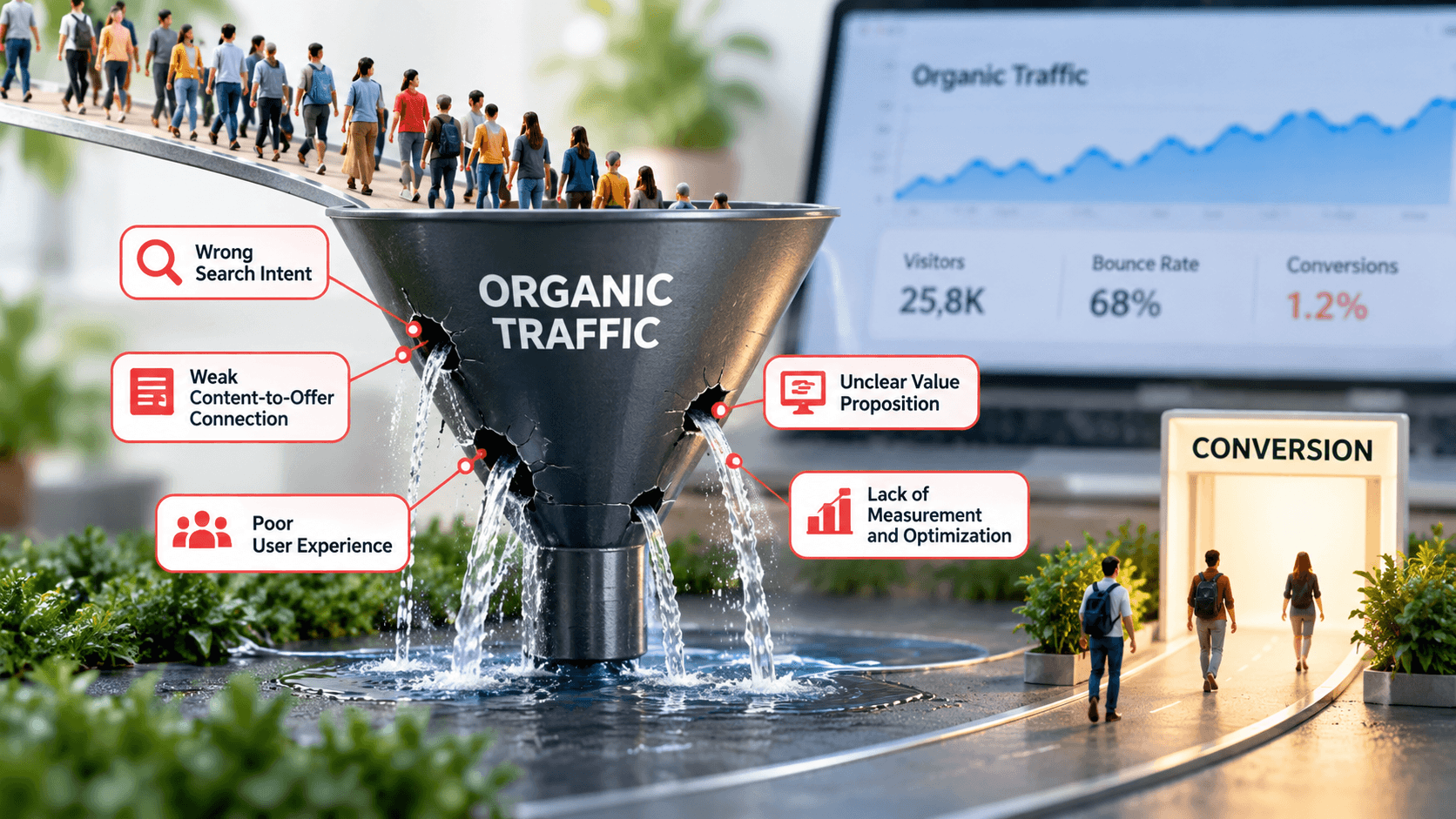
Imagine checking your website analytics every morning and seeing a steady increase in organic traffic. Your articles rank on Google, your target keywords bring visitors, and your SEO reports show encouraging numbers. Yet, when you check your leads, enquiries, sales, or newsletter subscriptions, the results barely move.
It is a frustrating situation for any business owner, marketer, or website publisher. You have invested time in keyword research, content creation, technical SEO, and link building. Search engines send people to your website, but those visitors leave without taking the action you want.
If your organic traffic is growing while conversions remain flat, you may not have a traffic problem. You may have a conversion problem.
Organic traffic not converting is often a sign that something breaks between attracting a visitor and helping that visitor take the next step. The issue could involve search intent, content relevance, user experience, trust, or the conversion process itself.
The good news is that you do not always need more traffic to improve results. Sometimes, fixing a few weaknesses on your existing pages can generate more enquiries and sales without increasing your SEO budget.
In this guide, we will explore five common website conversion bottlenecks, explain how to identify them, and share practical steps to turn more search visitors into meaningful business outcomes.
Table of Contents
Why Organic Traffic Does Not Always Lead to Conversions
Organic traffic measures how many people arrive at your website through unpaid search results. Conversion rate measures how many visitors complete a desired action.
These metrics are related, but they tell different stories.
A visitor who reads a blog post, learns something useful, and leaves may represent a successful content experience. However, that visit may not contribute directly to revenue or lead generation.
Similarly, someone who searches for a quick definition might have no intention of purchasing a service. Another visitor might actively compare service providers and be ready to request a quote.
Both visitors count as organic traffic, but their likelihood of converting differs significantly.
Before changing your website, define what a conversion means for your business. Common examples include:
- Submitting a contact form.
- Requesting a consultation or product demonstration.
- Purchasing a product or service.
- Signing up for an email newsletter.
- Downloading a useful resource.
- Clicking through to a relevant service page.
- Calling your business or initiating a qualified enquiry.
Not every conversion has the same commercial value. A qualified sales enquiry may be more valuable than a newsletter subscription, while an online publisher might focus on advertising revenue, engaged readership, or email sign-ups.
Your conversion strategy should reflect your actual business goals rather than simply maximizing clicks.
Understand the difference between traffic and conversion rate
Consider a website that receives 10,000 organic visits per month and generates 50 leads.
Its organic visitor-to-lead conversion rate is:
\[ \text{Conversion Rate}=\frac{50}{10,000}\times100=0.5\% \]
Now imagine the website improves its landing pages and generates 100 leads from the same 10,000 visits.
The conversion rate rises to 1%.
That change doubles the number of leads without requiring additional organic traffic.
This is an illustrative example, not a universal benchmark. A realistic conversion rate depends on the industry, audience, conversion goal, traffic quality, and how the website measures sessions or users.
The lesson is simple: SEO brings potential customers to your website, but the experience you provide determines how effectively you turn that attention into action.
Bottleneck 1: Your Organic Traffic Does Not Match Search Intent
One of the biggest reasons organic traffic fails to convert is a mismatch between what visitors expect to find and what your website offers.
You might rank well for a keyword, attract hundreds of visitors, and still generate few enquiries because those visitors never intended to take the action you want.
Search intent explains the purpose behind a search query. When you understand that purpose, you can create content and landing pages that meet visitors at the right stage of their decision-making process.
Understand the four main types of search intent
1. Informational intent
Example: “What is technical SEO?”
The visitor wants to learn something. A helpful educational article, guide, or tutorial usually fits best.
2. Commercial investigation
Example: “Best SEO agency for small businesses”
The visitor compares options. Case studies, service comparisons, reviews, and pricing explanations can help.
3. Transactional intent
Example: “Buy SEO audit service”
The visitor is ready to take action. A focused service page with clear pricing information, benefits, and a direct CTA may work best.
4. Navigational intent
Example: Searching for a specific company or website
The visitor wants to reach a particular destination. Make your brand, navigation, and relevant page easy to find.
Problems arise when your page targets one type of intent but tries to serve another.
For example, someone searching for “how to improve website rankings” probably expects practical SEO advice. Sending that visitor directly to a sales page for an expensive SEO package may create friction.
The visitor might still need professional help, but your website has not yet established why that help would be valuable.
How to identify a search intent mismatch
Start with Google Search Console. Find the queries that generate the most impressions and clicks for your underperforming pages.
Then search those terms yourself and review the results. Examine the content formats that rank, the questions competing pages answer, and the solutions searchers appear to expect.
Ask yourself three questions:
- Does my page answer the exact question behind the search?
- Does the content provide enough value before asking visitors to buy or enquire?
- Does the next step naturally follow from what the visitor came to learn?
If the answers are no, improve the page before investing more time in link building or publishing additional articles.
Match the call to action to the visitor’s intent
A useful conversion strategy does not force every visitor into the same funnel.
For informational articles, offer a relevant checklist, template, newsletter, or link to a deeper guide. For comparison-focused content, provide a case study, transparent service comparison, or consultation option. For high-intent visitors, make it easy to request a quote or complete a purchase.
Consider a digital marketing agency that attracts visitors searching for “how to build backlinks.”
Instead of placing a sales-heavy banner at the top of the article, it could explain the link-building process, show examples of quality outreach, and then offer a link audit or outreach consultation to readers who want professional assistance.
That transition makes sense because the offer relates directly to the problem the article addresses.
What to fix first: Identify five organic landing pages with high traffic but few meaningful conversions. Compare their search intent with their content, offer, and call to action. Prioritize the pages where the mismatch is clearest.
Bottleneck 2: Your Content Attracts Readers but Fails to Move Them Forward
Your article can answer a question perfectly and still fail to support your business goals.
This does not mean every blog post needs to become a sales pitch. It means your content strategy should help readers progress from understanding a problem to exploring a relevant solution when they are ready.
Many websites treat content marketing as a publishing exercise. They research keywords, write articles, add images, publish regularly, and wait for leads to arrive.
However, visitors often need a logical path between the article they discover and the service, product, or resource that can help them further.
Why informational blog posts often fail to generate leads
Consider a website that publishes an article titled “10 Common Website SEO Mistakes.”
The article attracts readers who want to improve their rankings. It explains technical errors, title tag problems, and internal linking issues.
However, the article ends without suggesting a next step. It contains no links to relevant guides, no downloadable audit checklist, and no connection to the company’s SEO services.
Readers receive information but have no clear reason to explore the rest of the website.
This creates one of the most common forms of traffic leaking from a website: visitors leave because the publisher never connects their immediate question to a useful next action.
Build a content funnel that reflects the buyer journey
A practical content strategy connects three stages.
Stage 1
Awareness: Help visitors understand the problem
Publish educational articles, explain common mistakes, answer frequently asked questions, and offer practical tutorials.
Example: “Why Is My Website Losing Organic Traffic?”
Stage 2
Consideration: Help visitors evaluate solutions
Use detailed guides, checklists, comparison pages, case studies, and troubleshooting resources.
Example: “SEO Audit Checklist for Business Websites”
Stage 3
Decision: Make the next action straightforward
Provide a relevant service page, product demonstration, consultation, or transparent quote request.
Example: “Request a Technical SEO Audit”
Not every reader will move through these stages in order. Some visitors arrive ready to buy, while others need several visits before they trust a company enough to enquire.
Your website should support both groups.
Use internal links to guide visitors toward relevant pages
Internal linking helps search engines discover relationships between pages, but it also helps people find information that answers their next question.
For example, an article about keyword research could link naturally to:
- A guide to search intent.
- An article explaining on-page SEO.
- A tutorial on internal linking.
- A relevant SEO service page.
These links should provide genuine value. Avoid inserting unrelated links merely to increase page views or push readers toward a commercial offer.
Use descriptive anchor text that tells visitors what they will find after clicking.
Instead of writing “Click here,” use a phrase such as “learn how to conduct a technical SEO audit.”
Create lead magnets that solve a specific problem
A lead magnet is a useful resource that visitors can access, sometimes in exchange for their email address.
Effective examples include:
- SEO audit checklists.
- Content planning templates.
- Website launch guides.
- Industry-specific worksheets.
- Email marketing calendars.
- Detailed case studies.
The key is relevance. A generic ebook may attract subscribers who never become customers. A practical resource that addresses a specific business challenge can attract people with a stronger interest in your services.
Keep the exchange fair. Explain what the visitor receives, why you need their email address, and whether they will receive future marketing messages.
How to convert blog traffic into leads without damaging the reading experience
Place your calls to action where they support the content rather than interrupt it.
For example, a tutorial about website speed could include a short invitation after explaining common performance problems: readers who cannot resolve those issues can request a technical review.
A guide about content strategy might offer a downloadable editorial calendar near the end of the article.
Use one primary CTA and, where appropriate, a less demanding secondary option. Too many competing buttons can confuse visitors and reduce the clarity of the next step.
What to fix first: Audit your ten most visited articles. For each one, identify the reader’s main problem, the most useful related page, and one relevant next action. Add contextual internal links and a clear CTA where they genuinely help.
Bottleneck 3: Poor User Experience Creates Friction Before Conversion
Even visitors who want your product or service may leave if your website makes the next step difficult.
A page can contain excellent information and still underperform because the text feels overwhelming, the CTA is difficult to find, the layout breaks on mobile, or the contact form asks for too much information.
User experience affects how easily people understand your offer and complete an action. Small obstacles can accumulate until visitors decide that leaving is easier than continuing.
Slow page speed can weaken the conversion journey
A slow website makes people wait before they can read, navigate, or interact with your content.
The effect depends on the visitor, the task, and the cause of the delay. A few seconds of extra loading time will not explain every low-converting page, but performance problems deserve attention when they affect important landing pages.
Use Google’s PageSpeed Insights to review your URLs on mobile and desktop.
Pay particular attention to Core Web Vitals:
- Largest Contentful Paint (LCP): Measures loading performance. A good result is 2.5 seconds or less.
- Interaction to Next Paint (INP): Measures responsiveness to user interactions. A good result is 200 milliseconds or less.
- Cumulative Layout Shift (CLS): Measures unexpected visual movement. A good result is 0.1 or less.
These thresholds help assess user experience, but passing them does not guarantee conversions.
Start by optimizing oversized images, removing unnecessary scripts, reducing excessive third-party widgets, and improving server response where needed. Recheck the actual pages that generate organic traffic instead of relying solely on a homepage score.
Mobile usability problems can hide your best conversion opportunities
Many websites receive substantial traffic from smartphones. If a page works well on a desktop but feels awkward on a mobile device, you may lose visitors before they can complete an action.
Common problems include:
- Buttons that are too small or too close together.
- Text that requires horizontal scrolling.
- Pop-ups that cover the main content.
- Forms that are difficult to complete on a touchscreen.
- Navigation menus that hide important pages.
- Phone numbers that users cannot easily tap to call.
Test the complete journey on a real mobile device. Open the article, follow an internal link, review the offer, complete the form, and confirm that the success message appears.
Do not assume that a responsive theme automatically creates a smooth conversion experience.
Simplify your forms and calls to action
Every field introduces another task for the visitor.
If you need a name, email address, and a short description to respond to an enquiry, asking for a phone number, company size, annual revenue, job title, and several other details may discourage people from submitting the form.
Collect only the information you genuinely need at that stage. You can ask qualifying questions during a later conversation.
Make your CTA specific, visible, and easy to understand.
Compare these examples:
| Vague CTA | Clearer CTA |
|---|---|
| Submit | Request an SEO audit |
| Learn More | Explore our SEO services |
| Click Here | Download the free checklist |
| Get Started | Request a consultation |
The best wording depends on what happens next. Do not promise a free audit, instant response, or guaranteed result unless you can deliver it.
Reduce distractions on high-intent landing pages
A service page should help visitors evaluate the offer and decide whether to take the next step.
Excessive banners, unrelated recommendations, intrusive pop-ups, and multiple competing CTAs can distract from that decision.
This does not mean every page needs a minimal design. A news article may benefit from category navigation and related stories, while a focused service landing page may perform better with fewer distractions.
Design the page around its purpose.
What to fix first: Review your highest-traffic landing pages on mobile, test every CTA and form, and check loading performance. Fix broken elements and obvious friction before making broad visual redesigns.
Bottleneck 4: Visitors Do Not Trust Your Website Enough to Take Action
Trust plays a major role in conversion, especially when visitors must share personal information, pay for a product, or hire a service provider.
A visitor may find your article through Google, appreciate the advice, and still hesitate to contact your company. They may not know who created the content, whether your business has relevant experience, what your service includes, or whether you can deliver the promised outcome.
When a website leaves these questions unanswered, visitors have a reason to postpone their decision.
Make your expertise visible and verifiable
Trust grows when your website gives visitors clear reasons to believe what you say.
Start with the basics:
- Publish accurate author biographies that reflect real experience and qualifications.
- Maintain a detailed About page that explains your business and its purpose.
- Provide clear contact information and accessible customer support.
- Cite reliable sources when your content relies on external research or important factual claims.
- Explain how you developed your recommendations, tested a product, or evaluated a solution when that information matters.
- Keep your service descriptions, pricing information, and business policies consistent.
These details serve both readers and potential customers. They also align with Google’s guidance on helpful, reliable, people-first content, which emphasizes trust, useful original information, and clear authorship where appropriate.
Google Developers
+1
Do not invent credentials, testimonials, client names, awards, or performance statistics to make a website look authoritative. Fabricated proof can damage your reputation and mislead potential customers.
Use case studies to demonstrate what you can deliver
A case study can help visitors understand how your service works in a real business context.
For example, an SEO agency could document how it improved a client’s organic lead generation through better landing pages, relevant internal links, and clearer calls to action.
A credible case study should explain:
- The original business problem.
- The work the team actually performed.
- The period over which the work took place.
- The measurements used to evaluate results.
- The outcome and any limitations or other factors that affected it.
If organic enquiries increased from 20 to 32 per month, report the change accurately and explain the measurement period. Do not imply that the same outcome is guaranteed for every client.
When client permission allows, include relevant screenshots, anonymized data, or a client-approved testimonial. Real evidence is more persuasive than vague claims such as “We deliver exceptional results.”
Answer objections before visitors reach the contact form
Visitors often leave because they cannot find the information they need to make a decision.
A service page for an SEO company, for instance, could answer:
- What does the service include?
- Who is the service suitable for?
- How long does the process usually take?
- What information must the client provide?
- How will progress be measured?
- What affects the price?
- What happens after the initial consultation?
You do not need to publish a fixed price if your service requires a custom quotation. However, explaining the factors that influence pricing can reduce uncertainty.
Similarly, avoid guarantees about rankings, traffic growth, or revenue that you cannot control. Explain the process, realistic expectations, and the factors that influence results.
Check whether your website sends conflicting signals
Sometimes, a lack of trust comes from seemingly minor inconsistencies.
An old copyright year, broken testimonial link, outdated service page, conflicting business information, or form that never confirms successful submission can make visitors question the reliability of your website.
Review your most important pages as if you were evaluating the company for the first time.
What to fix first: Improve the About page, author information, contact details, service descriptions, and evidence of real work. Add testimonials or case studies only when you can verify their authenticity and use them appropriately.
Bottleneck 5: You Are Not Measuring the Right Data or Optimizing the Conversion Path
The final bottleneck is often less visible than the others. Your website might have the right content, a good design, and a credible offer, but you cannot identify what prevents visitors from converting because your analytics do not measure the complete journey.
Page views and organic clicks tell you how many people arrive. They do not automatically reveal which pages generate qualified leads, where users abandon a form, or whether a CTA contributes to sales. WordPress SEO tools for optimizing website content.
Without reliable measurement, you may spend weeks rewriting successful articles while overlooking a broken form on a high-intent service page.
Track meaningful conversion events in Google Analytics 4
Google Analytics 4 allows you to measure important actions as key events. Depending on your business, these might include a completed enquiry, a successful purchase, or a newsletter subscription.
Analytics Help
+1
Choose events that reflect genuine outcomes, not merely interactions that look impressive in a report.
For a lead-generation website, useful events may include:
- Successful contact form submissions.
- Consultation requests.
- Clicks on a phone number, where relevant.
- Completed newsletter registrations.
- Downloads of a relevant business resource.
- Qualified leads that progress through the sales process, when your CRM integration supports that measurement.
Be careful with event definitions. A button click does not always mean a form was submitted successfully. Likewise, a thank-you page view may overcount leads if visitors can revisit the page without completing the form.
Where possible, track successful outcomes rather than just attempts.
Use Google Search Console and GA4 together
These tools answer different questions.

Google Search Console
Use it to understand search visibility, queries, clicks, impressions, and click-through rates. Identify which pages attract organic search visitors and which queries bring them to your website.
Official resource: Search Console Help

Google Analytics 4
Use it to examine landing-page engagement, key events, conversion paths, and the performance of important user journeys.
Official resource: Google Analytics Help
For a useful analysis, connect the search query and landing-page insights with what visitors do after arriving.
For example, Search Console might show that an article receives 5,000 clicks per month. GA4 could show that readers rarely visit the related service page, while your form tracking reveals that few people submit enquiries.
Those findings suggest several possible opportunities: improve internal linking, make the next step more relevant, or investigate whether the service offer meets the visitor’s needs.
The data identifies where to investigate. It does not automatically prove the cause, so validate your explanation before making large changes.
Find where visitors leave the conversion funnel
A simple funnel for a service business might look like this:
Organic landing page
Visitor discovers your content
Relevant service page
Visitor explores a solution
Enquiry form
Visitor considers contacting you
Successful conversion
Qualified lead or completed action
Measure the transitions between these steps wherever your analytics setup allows.
If many visitors reach the service page but few open the enquiry form, investigate the offer, messaging, and CTA.
If many visitors begin the form but few complete it, test the form on different devices, review validation errors, and remove unnecessary fields.
If enquiries increase but qualified leads do not, the problem might involve targeting, offer clarity, or lead qualification rather than the website’s basic conversion rate.
This distinction matters because generating more enquiries does not necessarily mean generating more business.
Run controlled conversion experiments
Once you have identified a plausible bottleneck, test one meaningful change at a time where practical.
Examples include:
- Rewriting a CTA to make its outcome clearer.
- Shortening a form.
- Adding a relevant case study to a service page.
- Improving the opening section of a landing page.
- Replacing a generic banner with a contextual offer.
Define the outcome before the test begins. If you change the page design, headline, CTA, and form simultaneously, you may struggle to identify which change affected the result.
Also consider traffic volume and normal fluctuations. A small website may not generate enough conversions for a short experiment to provide a reliable answer. Avoid treating a small numerical difference as proof of success.
What to fix first: Verify that important conversion events work correctly. Then compare landing-page traffic with successful conversions and inspect the steps between arrival and completion.
How to Calculate and Improve Your Organic Conversion Rate
A consistent measurement framework helps you determine whether your optimization work produces meaningful results.
For a lead-generation website, calculate the organic visitor-to-lead conversion rate using a clearly defined denominator.
\[ \text{Organic Conversion Rate}= \frac{\text{Organic Visitors Who Convert}} {\text{Organic Visitors}}\times100 \]
If your reporting system measures sessions rather than unique visitors, use organic sessions in the denominator and label the metric accordingly. Do not compare rates calculated using different measurement methods as though they were identical.
Here is an illustrative example:
| Metric | Before optimization | After optimization |
|---|---|---|
| Organic visits | 10,000 | 10,000 |
| Leads | 50 | 80 |
| Conversion rate | 0.5% | 0.8% |
In this example, leads increase by 60% while organic traffic remains unchanged. The improvement could come from better targeting, stronger content pathways, reduced friction, or other changes that help visitors take action.
These numbers illustrate the calculation, not a promised result or industry benchmark.
Prioritize fixes by impact and effort
You do not need to redesign your entire website at once.
Start with changes that address clear problems and require relatively little effort. For example, fixing a broken form may matter more than redesigning a footer. Adding a relevant internal link may be more useful than publishing another article on a topic your site already covers extensively.
Use this simple prioritization framework:
| Potential fix | Expected impact | Typical effort |
|---|---|---|
| Repair a broken conversion form | High if the form blocks leads | Low to medium |
| Improve CTA relevance | Medium to high | Low |
| Add contextual internal links | Medium | Low |
| Improve mobile usability | High if key tasks are difficult | Medium |
| Rewrite mismatched content | High when intent is clearly wrong | Medium |
| Redesign the entire website | Uncertain without evidence | High |
These ratings are illustrative. Actual impact depends on the website, audience, and severity of each problem.
The most effective improvement plan begins with evidence, not assumptions.
A Practical 30-Day Plan to Stop Traffic From Leaking
Use the following four-week plan to turn these ideas into a manageable optimization process.
Your optimization checklist
0/12 complete
Week 1: Audit your organic landing pages
Identify your highest-traffic pages in Search Console and GA4.Compare search intent, landing-page content, and conversion performance.Check that form submissions and other key events track correctly.
Week 2: Improve content pathways
Add relevant internal links to useful guides and service pages.Match CTAs to the visitor’s search intent.Create one useful next step for each priority article.
Week 3: Remove conversion friction
Test forms, navigation, and CTAs on mobile devices.Review page speed and Core Web Vitals.Improve service descriptions and add verifiable trust signals.
Week 4: Measure and refine
Compare conversion rates with your original baseline.Identify the biggest remaining drop-off point.Test one priority improvement and document the result.
Copy checklist
Do not expect every improvement to produce an immediate increase in leads. Some changes address obvious technical problems, while others need time and sufficient data to evaluate.
Keep a record of what you changed, when you changed it, and which metric you expected to improve. This will help you distinguish useful improvements from changes that make little difference.
Frequently Asked Questions
1. Why is my organic traffic increasing but conversions are decreasing?
Your website may attract a broader audience, rank for less commercially relevant queries, or bring visitors to pages that do not meet their expectations. Changes to your offer, user experience, or conversion tracking can also affect the numbers. Compare traffic quality and conversion performance by landing page, query, device, and conversion type before deciding what caused the decline.
2. What is a good organic conversion rate?
There is no single conversion rate that works for every website. An ecommerce store, a local service business, a B2B company, and an informational blog have different goals and visitor journeys.
Establish a baseline using a consistent measurement method, then compare similar pages and traffic segments over time. Focus on qualified leads, sales, and other meaningful outcomes rather than chasing an arbitrary industry average.
3. How can I convert blog traffic into leads?
Start by understanding the question each article answers. Add relevant internal links, offer a useful resource, and provide a clear CTA that follows naturally from the content.
For example, an article about website audits could link to a technical SEO checklist and then to a related audit service. Avoid forcing every reader into a sales funnel before you have addressed their needs.
4. Should I publish more content if my organic traffic is not converting?
Not necessarily. More articles may increase traffic without addressing the underlying problem. First, review the search intent, content relevance, user experience, trust signals, and conversion tracking of your existing pages.
If you find that your current content attracts the wrong audience, improve the targeting before expanding your publishing schedule.
5. Can internal linking improve organic conversions?
Yes, when internal links help visitors discover relevant information and appropriate next steps. They can connect educational articles with comparison guides, service pages, and useful resources.
However, adding more links alone does not guarantee better conversions. Link relevance, placement, anchor text, and the usefulness of the destination all matter.
6. How long does it take to improve organic conversion rates?
Some fixes, such as repairing a broken form or correcting a misleading CTA, may have an immediate effect on the user journey. Other changes, including content improvements and landing-page experiments, require enough traffic and conversions to evaluate reliably.
Measure the results against your original baseline and account for normal fluctuations before concluding that a change worked.
Final Thoughts: Turn Your Existing Traffic Into Better Results
When organic traffic fails to convert, the answer is not always to publish more content, build more backlinks, or chase higher rankings.
The more useful question is what happens after visitors arrive.
Do they find the answer they expected? Can they discover a relevant solution? Does the website make the next step easy? Do they have enough evidence to trust your business? And can you measure whether they complete the actions that matter?
These questions reveal the website conversion bottlenecks that often remain hidden behind impressive traffic reports.
Start with the five areas covered in this guide: search intent, content pathways, user experience, trust, and conversion measurement. Identify the most significant weakness on your website, make a focused improvement, and evaluate the result.
Google’s guidance also emphasizes creating helpful, reliable content for people rather than producing pages solely to attract search traffic.
The ultimate goal is not simply to attract more visitors. It is to help the right visitors find the information, solutions, and next steps they need. When your content and conversion experience work together, your existing organic traffic has a better opportunity to deliver measurable business value.